👉 Try MindtrixAI’s Free LLMs.txt Generator, AI Humanizer Tool & AI Paraphrasing Tool Now →
Should You Use OpenClaw? OpenClaw is one of the most capable open-source AI agents available right now. It can actually do things on your computer, not just answer questions.
But it is not for everyone. If you are comfortable with basic technical setup, it can genuinely change how you work. If you are not, the setup will frustrate you fast.
Keep reading this OpenClaw review to find out if it is worth your time and money.
| Verdict Item | My Take |
|---|---|
| Best for | Developers, solopreneurs, technical power users |
| Skip it if | You want plug-and-play with zero setup |
| Real monthly cost | $6 to $200 depending on how you use it |
| Is it free? | Yes, the software itself is free (MIT license) |
| Official site | openclaw.ai |
Key Takeaways Before You Read On OpenClaw Review
- OpenClaw runs on your own computer or server and connects to apps like WhatsApp, Telegram, and Discord
- It does not just chat. It browses the web, organizes files, writes code, manages your inbox, and more
- The software is free, but API tokens and server hosting cost real money
- There is a known security flaw (CVE-2026-25253) patched in version 2026.1.29. Update immediately if you have not
- Setup is genuinely hard for non-technical users, but a managed cloud option exists for $59 per month
- The community around it is one of the most active in open-source AI right now
What Is OpenClaw and Why Is Everyone Talking About It?
Let me give you the simplest possible explanation.
Imagine you had an assistant who lived inside your WhatsApp. You could send them a voice note saying “summarize my emails, book me a restaurant for Friday, and remind me to call my accountant.” And they actually did all of it, without you needing to open five different apps.
That is basically what OpenClaw is.
OpenClaw is a free, open-source AI agent that lives on your computer or a rented server. You interact with it through messaging apps you already use. And instead of just chatting back like a regular AI, it actually executes tasks.
It can browse the web, run code, read and write files, manage emails, control smart home devices, and chain dozens of steps together without you sitting there watching.
According to Gartner research cited by Zealous Systems, less than 5% of enterprise applications had embedded AI agents in 2025. That number is expected to hit 40% by the end of 2026, a sign of just how fast this category is moving. OpenClaw is arguably the most viral product sitting right at the center of that shift.
It was created by Austrian developer Peter Steinberger. The project launched in November 2025 under the name Clawdbot, then became Moltbot for three days after trademark complaints from Anthropic, then finally landed on OpenClaw in January 2026. The growth that followed was historic.
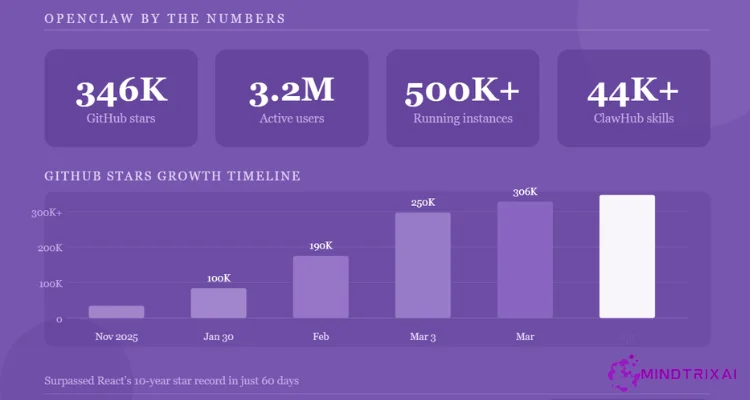
On March 3, 2026, OpenClaw surpassed React to become the most-starred software project on GitHub. By April 2026, the project had crossed 346,000 GitHub stars, 3.2 million active users, and 500,000 running instances globally.
“OpenClaw isn’t another chatbot tab sitting in your browser. It’s a fully autonomous agent that can browse the web, execute commands, organize files, connect to messaging apps, and chain together workflows without requiring constant supervision.” – Unite.AI
How Did I Test OpenClaw?
I tested OpenClaw for three weeks before writing this review. Here is exactly what I did so you can judge how relevant this is to your situation.
I ran it on a Hetzner VPS (around $4 per month) and also locally on a MacBook Pro. I connected it to Telegram and Discord as my main interfaces. I used Claude Sonnet 4.6, GPT-4o, and Gemini Flash as the underlying AI models on different days to compare cost and quality.
The workflows I tested included real tasks: clearing and triaging a backlog of 200 emails, writing weekly research summaries, monitoring GitHub for pull request updates, scraping product pricing from three e-commerce sites weekly, and sending myself automated morning briefings.
I also tracked my actual token costs every day for three weeks and compared them to estimates I had seen online. And I spent time reading through community discussions on GitHub Issues, Hacker News threads, and developer forums to understand what real users were running into, not just what the docs promised.
How Does OpenClaw Actually Work? (No Tech Jargon, I Promise)
Think of OpenClaw like this.
You send it a message: “Find me the three best coworking spaces in my city, compare prices, and put the results in a document.”
A regular chatbot would type out some suggestions and call it done.
OpenClaw would actually search the web, open the pages, pull the relevant data, compare prices, create a document, save it to your computer, and send you a summary, all without you doing anything else.
Here is what happens behind the scenes, step by step:
- It receives your message through Telegram, WhatsApp, Discord, or whatever app you set up
- It figures out what steps are needed to complete your request
- It picks the right tools (web search, file manager, code runner, etc.) and executes them
- It checks whether the output actually makes sense
- If something fails, it tries again automatically
Three things make OpenClaw genuinely different from a simple chatbot wrapper.
The first is that it can start working without you. You can set it up to run tasks on a schedule, respond to incoming emails, or trigger automatically when a file changes. It does not wait for you to send a message.
The second is persistent memory. It stores information about you locally as Markdown files. After a week of use, it remembers your preferences, your project names, and how you like your reports formatted.
The third is real system access. It can write code, run shell commands, control your browser, and do things that a browser-based chatbot simply cannot do.
What Can OpenClaw Actually Do? Real Features Explained Simply
How Does OpenClaw Handle Messaging and Email?
OpenClaw connects to WhatsApp, Telegram, Discord, Slack, Signal, and iMessage. It can read incoming messages, draft replies, and even send them on your behalf. I used it to triage my Telegram inbox every morning. It flagged the important ones and ignored the noise.
The email management was honestly the feature I found most useful. I gave OpenClaw access to a dedicated Gmail account and within two days it was sorting, summarizing, and drafting replies faster than I ever would have.
One user in the OpenClaw showcase described clearing 10,000 emails as part of their setup. I believe it. SecurityScorecard researchers found over 500,000 running OpenClaw instances globally by April 2026, which tells you just how fast people have adopted it for exactly this kind of daily task.
How Does the Web Research and Browser Automation Work?
OpenClaw can open pages, fill in forms, extract specific data, and monitor websites for changes. I used it to pull competitor pricing from three e-commerce sites weekly. It ran the task every Monday morning and dropped the results in a Telegram message before I woke up.
Can OpenClaw Control Files and My Computer?
Yes. It can read files, write to them, organize folders, and run scripts. If you give it full access, it is essentially a hands-free operator for your computer. If you want tighter control, you can sandbox it to specific folders and restrict access to only what it needs.
How Does OpenClaw Help with Coding and Development Work?
OpenClaw’s built-in Pi coding agent can write, test, and update its own new skills automatically. I watched it fix a broken GitHub Actions workflow by reading the error log, writing a corrected script, and running it, with no input from me after the initial instruction.
What Are OpenClaw Skills and Integrations?
Skills are the building blocks of what OpenClaw can do. There are 50-plus official integrations including GitHub, Obsidian, Todoist, Spotify, Hue lights, WHOOP, and more.
The community plugin store (ClawHub) grew from 5,700 skills in early February 2026 to over 44,000 skills by April 2026. You can also write your own skills. They are just folders with a SKILL.md instruction file inside, which makes them remarkably easy to share.
“After years of AI hype, I thought nothing could faze me. Then I installed OpenClaw. From nervous ‘hi what can you do?’ to full throttle – design, code review, taxes, PM, content pipelines. AI as teammate, not tool.” – Community user @lycfyi via openclaw.ai
How Much Does OpenClaw Actually Cost?
This is the part most articles get wrong or skip entirely. Let me break it down honestly.
The software itself is completely free. You do not pay anything to download or run OpenClaw. But running it in a way that is actually useful costs money from two sources.
What Does It Cost to Host OpenClaw?
OpenClaw needs a server that stays on 24 hours a day. You can run it on your own computer, but then your computer has to stay on 24 hours a day. Most people rent a cheap cloud server instead.
A Hetzner VPS costs around $4 to $13 per month and handles personal use easily. Oracle Cloud has a free tier with 4 ARM CPUs and 24GB RAM that works well if you can deal with the setup. For most people, hosting costs between $5 and $15 per month.
How Much Do the AI Model Tokens Actually Cost?
Every time OpenClaw does something such as reads a file, searches the web, thinks through a multi-step task, it sends a request to an AI model and you pay for that. A single complex task can involve 3 to 8 model calls.
On top of that, OpenClaw has a “heartbeat” system that regularly checks in the background for scheduled tasks. That burns tokens even when you are not actively using it. A single task typically runs 3 to 8 LLM calls and can consume 80,000 to 150,000 input tokens, which is far more than most people expect before they see their first bill.
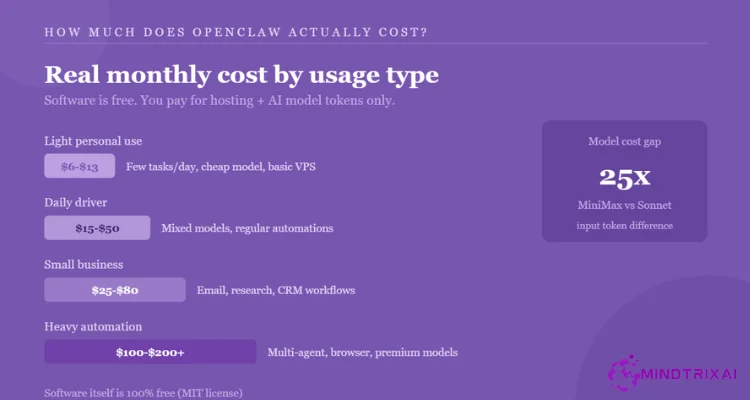
The monthly ranges are as:
| Use case | Estimated monthly cost |
|---|---|
| Light personal use (few tasks, cheap model) | $6 to $13 |
| Daily driver with mixed models | $15 to $50 |
| Small business automations | $25 to $80 |
| Heavy multi-agent workflows | $100 to $200 plus |
| Unmonitored runaway workflows | Up to $3,600 (one reported case) |
The model you choose matters enormously. According to haimaker.ai’s cost analysis, the cost gap between a budget model like MiniMax M2.5 and Claude Sonnet 4.6 is about 25 times on input tokens. For 70 to 80% of routine tasks, the cheaper model is genuinely good enough.
The managed cloud option: If the server setup sounds too complicated, OpenClaw offers a managed cloud plan for $59 per month (first month $29.50). You get hosting, model costs, integrations, and automatic updates included. No terminal required.
Important update on subscriptions: As of April 4, 2026, Anthropic officially cut off subscription access for third-party tools. OpenClaw now requires a paid API key. You can no longer route your Claude Pro or Max subscription through it.
“OpenClaw costs between $6 and $200 per month depending on how you use it. Most indie developers and vibe coders will land in the $12 to $30 range.” – vibecoding.app
What Works Really Well in OpenClaw? (From My Own Testing)
I want to be specific here, not vague, because that is what actually helps you decide.
Email triage worked better than I expected. Within two days of setup, OpenClaw had learned which senders I considered urgent and which I could ignore until the afternoon. It saved me around 30 to 40 minutes per day on inbox management alone.
This lines up with what a 30-day ClawTank user reported: roughly 45 minutes saved daily across email, research, scheduling, and drafts.
The morning briefing was genuinely useful. Every day at 8am I got a Telegram message with my calendar summary, top emails, and a short news digest on the topics I had told it to watch. After a week it felt less like a feature and more like a habit I did not want to lose.
Model switching mid-session is seamless. Typing “/model sonnet” switches the underlying AI in seconds. I set cheaper models as the default and only switched to more powerful ones for complex tasks. My average daily API cost stayed under $2.
The community is excellent. When I got stuck on a Telegram webhook issue, someone in the GitHub Discussions had answered the exact same question two days earlier.
The project has over 1,600 contributors and 70,400 forks on GitHub as of April 2026, and the Discord has over 60,000 members with genuinely fast response times.
What Genuinely Frustrated Me About OpenClaw? (Honest Problems You Should Know About)
Getting It Running Takes Real Time
I am reasonably technical. It still took me close to two hours to get everything configured properly on first setup, including connecting Telegram, setting up API keys, and sorting out the Docker permissions. If you have never used a terminal, this will take significantly longer. It is not a browser app or a “login” product. You are building a server yourself.
Can OpenClaw Wander Off-Task When Instructions Are Vague?
Yes, and this surprised me more than I expected. When I gave it clear, specific instructions, it performed well. When I gave it something ambiguous like “help me organize my research,” it sometimes went in unexpected directions, made assumptions I had not authorized, and marked the task complete before I felt it actually was.
A data scientist who tested it over several weeks described it plainly: automation should reduce supervision, but with OpenClaw you often end up supervising the automation itself. That was accurate in my experience, especially during the first two weeks.
Silent Failures Are a Real Problem
This is the issue that surprised me most. Twice during testing, OpenClaw completed a task with partial or incorrect output and gave no indication anything had gone wrong. With a chatbot you re-read the answer. With an agent, you often assume the task is done. That assumption is risky.
How Large Is the OpenClaw Security Risk?
This matters a lot, and not enough people talk about it plainly.
OpenClaw has access to your files, your shell, your email, your APIs, and your browser. A critical vulnerability, CVE-2026-25253 with a CVSS score of 8.8, was discovered that allows attackers to steal authentication tokens through malicious links.
It has been patched in version 2026.1.29. If you have not updated, do it right now before anything else.
By April 2026, security researchers found over 135,000 exposed OpenClaw instances across 82 countries, with over 50,000 directly vulnerable to remote code execution. Nine CVEs were disclosed in four days in March 2026.
Many of these exposures happened because people gave OpenClaw broad access to get it running quickly and then forgot to lock things down.
- Giving file access to your entire computer instead of a specific folder
- Storing API keys in plain text config files
- Connecting your primary personal email instead of a dedicated one
- Skipping Docker sandboxing because it seems complicated
- Not setting spending limits on your API provider accounts
Can Token Costs Spike Without Warning?
Absolutely, and it catches people off guard more than almost anything else. One developer reported spending $623 in a single month before they understood what was driving the cost.
One extreme case of unmonitored workflows hit $3,600 in a single month. The heartbeat system, background monitoring, and browser automation sessions quietly accumulate charges. Set spending alerts with every API provider before you connect anything important.
OpenClaw Security: What to Check Before You Deploy
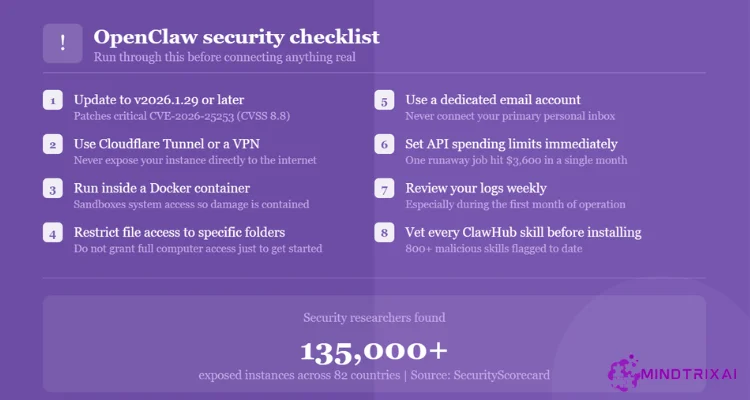
Do not skip this section. Run through this checklist before connecting OpenClaw to anything real.
- Update to version 2026.1.29 or later (patches CVE-2026-25253)
- Put OpenClaw behind a Cloudflare Tunnel or VPN. Never expose it directly to the public internet
- Use Docker containers to sandbox system access
- Restrict file access to specific directories only
- Use a separate email account, not your primary inbox
- Set spending limits and alerts with every AI provider you connect
- Review your logs weekly for the first month
- Check ClawHub plugin sources before installing any community skills. Over 800 malicious skills have been flagged on ClawHub as of April 2026
OpenClaw vs Claude.ai: Which One Is Actually Better for You?
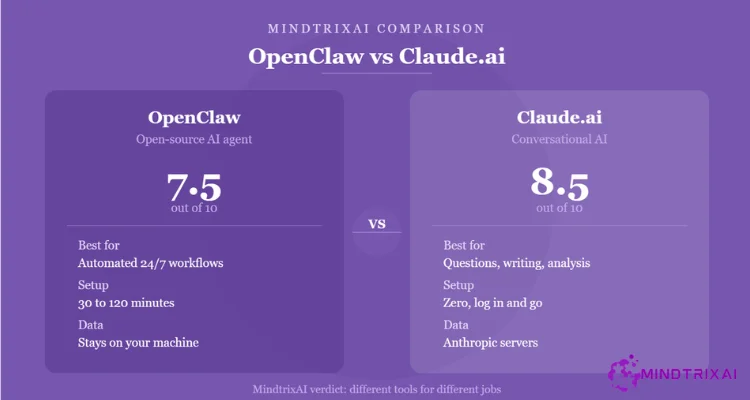
A lot of people ask this. They are different tools trying to do different things, but it is a fair comparison because both involve AI doing work for you.
| Feature | OpenClaw | Claude.ai |
|---|---|---|
| What it does | Acts autonomously, executes tasks, runs code, manages files | Conversational AI, answers questions, helps write and analyze |
| Setup required | Significant (30 to 120 minutes for self-hosting) | Zero setup, log in and go |
| Lives where | Your own server or computer | Anthropic’s servers |
| Your data | Stored locally on your machine | Processed on Anthropic’s servers |
| Can work without you | Yes, runs on a schedule in the background | No, requires you to send a message each time |
| Memory | Persistent across all sessions, locally stored | Memory features available but more limited |
| Integrations | WhatsApp, Telegram, Gmail, GitHub, 50-plus apps | Claude.ai interface only |
| Cost | Free software, $6 to $200 plus monthly in running costs | $20 to $200 per month subscription |
| Best for | Automating real workflows that repeat | One-off questions, writing, research, analysis |
| Security control | You control everything | Managed by Anthropic |
| Beginner-friendly | No | Yes |
| Reliability | Depends on your configuration | Consistent and predictable |
| Rating | 7.5/10 | 8.5/10 |
OpenClaw wins on autonomy, integrations, and the ability to do actual work in the background while you sleep. If you want a 24/7 agent that manages your inbox, builds your reports, and runs code without you, OpenClaw is the right call. These two tools are not really competing. They are for different jobs entirely.
What the Community Is Actually Saying About OpenClaw
Rather than cherry-picking glowing testimonials from the official website, here is a more honest cross-section of what real users across developer forums and review threads have shared.
From a developer who spent $400 testing it:
After running OpenClaw through structured experiments and intentionally pushing it to find failure modes, the verdict was honest. When it works, it is impressive. When it fails, it burns time and tokens.
The overall assessment: “a powerful experiment, not yet a dependable worker.” The recommendation was to revisit in two to three months as the project matures.
From a 30-day daily user:
After a full month of daily use, the time savings worked out to roughly 45 minutes per day across email triage, research, scheduling, and writing drafts. Monthly costs landed around $18 to $25.
The key observation: “OpenClaw is worth it for anyone who treats it like a real assistant and not a novelty. If you just need a chatbot for occasional questions, stick with ChatGPT.”
From the community model voting leaderboard:
Users running high-volume automation workflows consistently favor Minimax M2.7 and Kimi K2.5 over premium models for cost efficiency. One user noted that when cheaper models failed on a specific cron task, switching to Minimax M2.7 solved it in five minutes, and the quota felt nearly impossible to exhaust.
As of April 2026, Kimi K2.5 leads community votes as the best overall model for OpenClaw.
From the security testing community:
One independent review put it plainly: the Mac Mini setup that people obsess over gives physical control but often leaves OpenClaw architecturally exposed by default. A $5 VPS with proper isolation beats a $600 local machine with open ports. The setup matters far more than the hardware.
From a solo founder running it for two months:
Four separate agents running simultaneously: one for strategy, one for operations, one for research, one for client communication.
The verdict: “It will actually be the thing that nukes a ton of startups, not ChatGPT. The fact that it’s hackable, self-hackable, and hostable on-prem will make sure tech like this dominates conventional SaaS.”
OpenClaw Review Ratings by MindtrixAI
| Category | Score | What This Means |
|---|---|---|
| Capability and Power | 9/10 | Among the most capable open-source agents available today |
| Ease of Setup | 4/10 | Steep learning curve for self-hosting |
| Reliability | 6.5/10 | Strong on clear tasks, inconsistent on vague ones |
| Security (when configured properly) | 7/10 | Solid if hardened, risky if not |
| Value for Money | 8/10 | Free software with transparent and controllable running costs |
| Community and Ecosystem | 9/10 | One of the best open-source communities active right now |
| Overall | 7.2/10 | Excellent for the right user, frustrating for the wrong one |
Pros and Cons of OpenClaw
What I liked:
- The software is completely free and open-source
- It actually does things, not just generates text about doing things
- Data stays on your own machine by default
- Works through messaging apps you already use daily
- Persistent memory genuinely improves over time
- Model-agnostic so you can always switch to cheaper options
- Community is large, active, and genuinely helpful
- Managed cloud option removes the technical barrier for non-developers
What I did not like:
- First-time setup took longer than expected even with good documentation
- Background maintenance (updates, security, debugging) adds weekly overhead
- Token costs can spike without warning if you are not monitoring
- Silent task failures require more active oversight than expected
- Security risks are real and require deliberate configuration to manage
- No longer compatible with Claude subscription tokens as of April 2026
- Ambiguous instructions often produce unpredictable results
Who Should Use OpenClaw?
It is a good fit for you if:
- You work with code, operations, research, or writing and repeat the same tasks daily
- You are comfortable using a terminal and do not mind a few hours of initial setup
- You want an AI that works while you are away from your computer
- You care about keeping your data on your own hardware
- You have a Telegram habit or are willing to build one
- You are willing to monitor costs and review what the agent actually did
According to Deloitte’s State of AI 2026 report cited in agent statistics research, only 21% of companies have a mature governance model for AI agents. That gap is exactly why user-level tools like OpenClaw, when properly configured, give individuals more control than most enterprise deployments.
Skip it for now if:
- You have never used a command line or SSH
- You need something reliable with zero debugging tolerance
- Your workflows involve sensitive client data and you cannot afford misconfiguration risk
- You want a simple question-answering tool. Claude.ai or ChatGPT will serve you better
Alternatives Worth Considering
According to Gartner forecast data via Zealous Systems, 40% of enterprise applications will embed task-specific AI agents by the end of 2026, up from less than 5% in 2025. That means the market for OpenClaw alternatives is growing fast.
| Tool | Best for | Key difference from OpenClaw |
|---|---|---|
| n8n | Visual workflow automation | Easier to debug, less autonomous, no conversational interface |
| Lindy | Non-technical users | Cloud-based, no setup, costs more, less flexible |
| BotPress | Structured chatbot flows | Better for customer-facing bots, not personal agents |
| Make (Integromat) | App-to-app automation | Drag-and-drop, no LLM reasoning |
| Claude.ai | Conversations and writing | Easier, more reliable, no task execution |
Don’t Miss These Trending Guides & Reports
- Most Popular App Statistics: The biggest apps, user trends, and revenue secrets
- How to Jailbreak ChatGPT: Breaking Down the Most Popular Prompt Engineering Strategies
- Best AI Visibility Tools: Improve AI Rankings Without Guesswork or Manual Tracking
- Using Claude Code for Free: Use Claude Code free without paying a single dollar
- AI Astrology Predictions: Can AI predict your destiny? Let’s find out
- Remove CapCut Watermark: Quick hack to remove watermark without quality loss
- Best AI Without Filter Chatbots: Best unfiltered AI tools ranked by privacy and power
- Best Apps Like Character AI Right Now: Faster, Freer, and Surprisingly More Advanced
- AI Smart Glasses vs Privacy: Data privacy and surveillance concerns explained
- Claude Fable 5 Review: Is it worth using?
- Best AI Coding Tools: Real testing. Honest recommendations.
FAQs about OpenClaw Review
Is OpenClaw actually free?
What is the difference between OpenClaw and a regular chatbot?
Is OpenClaw safe to use?
What AI models does OpenClaw work with?
Can I use OpenClaw without any technical knowledge?
Why does OpenClaw have so many names?
Can I still use my Claude Pro subscription with OpenClaw?
How do I keep OpenClaw costs under control?
Final Verdict on OpenClaw Review
OpenClaw is the most genuinely impressive open-source AI agent I have tested. When it works, and it does work well on clear, structured tasks, it delivers on the promise that most AI tools only hint at. The community around it is extraordinary, the development pace is fast, and the value per dollar is real for the right type of user.
That said, the hype has run slightly ahead of the reality in this OpenClaw review. The setup demands time and patience, the security configuration is not optional, and the token costs require active attention. Treat it as a powerful tool you need to learn, not a magic product that works out of the box.